Transcriptable’s Text Snippetscollect and organize your most commonly used phrases for easy pasting. Once you have an idea of which words or phrases you’ll need to repeat throughout your transcript, simply link them to hotkeys and get started. For instance, many transcripts require you to write the word MODERATOReach time the moderator speaks. Doing this by hand wastes valuable seconds and increases the number of times you have to pause. But copying the phrase and pasting it each time only allows you to keep a single phrase or speaker in your clipboard. Transcriptable’s Snippets feature assigns a different, customizable hotkey to each snippet, increasing your words per minute and improving your flow.
How do I create Text Snippets?
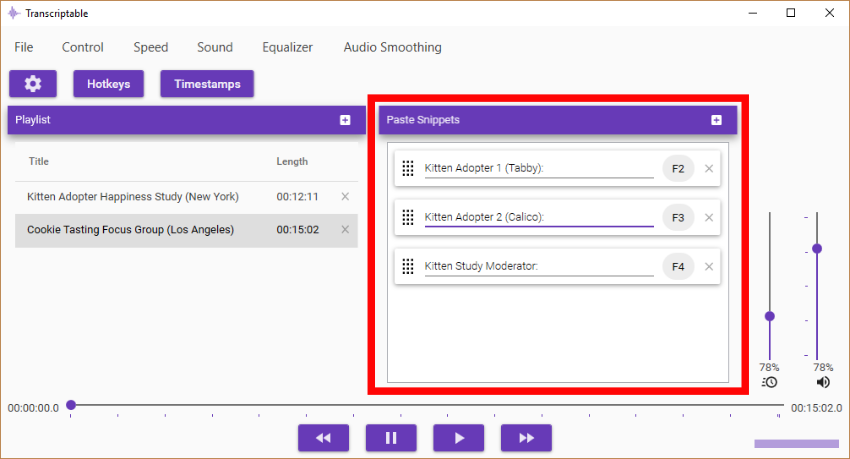
Your Snippets appear front and center in Transcriptable’s home screen. To add a Snippet, click the plus sign and enter your text into the Paste Snippet box. The hotkey linked to your Snippet appears on the right. Now, whenever you need your Snippet, just use its hotkey to paste it into your text editor. It’s like copy/paste on steroids.
But what if I need timestamps?
Enter [TIMESTAMP] in a Snippet box and Transcriptable will replace it with the current track time when you use its hotkey.
You can combine this easily to make your Snippets as fancy as you like. They can even include line breaks if you’re in need of more complex formatting. For example, if you have to specify the session and the speaker whenever you place a timestamp, your Snippet might look like this:
[TIMESTAMP]
Session 1, Kitten Study
Moderator:
Rearranging hotkeys
As you transcribe, you may decide to connect your most commonly used Snippets to your favorite hotkeys. Instead of deleting and recreating your Snippets, you can simply rearrange them. Just drag your Snippets up or downand they’ll automatically be given the new hotkey. Swap your snippets around at your convenience.
Can I set my own Text Snippet hotkeys?
You bet. Hotkeys can be changed in Settings, under Hotkeys. By default, the first three are assigned to F2, F3 and F4, but follow your heart.
How many Text snippets can I have?
You can have up to 10 snippets. The technology for 11 just isn’t there yet.